Product recommendations sound simple until you actually try to build a useful recommendation system for a growing WooCommerce store.
WooCommerce gives you basic related products, upsells, and cross-sells. But once you want recommendations based on customer behavior, sales performance, product relationships, cart activity, or different stages of the buying journey, the default options will feel limiting.
That is where WowRecommend comes in.
WowRecommend is an AI-powered WooCommerce product recommendation plugin from WPXPO. It combines recommendation rules, advanced filters, smart sorting, live previews, popup upsells, checkout order bumps, and recommendation analytics in one system.
In this WowRecommend review, we will look at how easy it is to use, what you get in the Free and Pro versions, what real users are saying, and whether the lifetime deal makes sense for your store.
What is WowRecommend and what does this product recommendation plugin do?
WowRecommend helps WooCommerce stores decide what products to recommend, where to recommend them, and which products should appear first. It is an all-in-one Product Recommendation Plugin for WooCommerce with 32+ advanced filters, smart sorting, multi-page placements, live preview, and AI-powered rule builder.
Instead of manually assigning a few upsells or cross-sells to individual products, you can create rules that work across your store.
For example, with WowRecommend, you can create recommendations such as:
- Show products from the same category but within a similar price range.
- Recommend items a customer recently viewed.
- Show your best-selling products first.
- Recommend products customers commonly buy together.
- Place an order bump directly on the checkout page.
- Show a targeted upsell after a customer adds a specific product to their cart.
The plugin currently provides recommendation filters across product data, sales and performance, customer behavior, and product relationships. It also includes different sorting methods, including popularity, conversion, freshness, price, rating, random order, and bought-together data.
Key capabilities of WowRecommend
Some of the most highlighted things you can do with the plugin include:
- Create recommendations with AI using natural-language prompts
- Build recommendations manually with advanced filters
- Use premade recommendation templates
- Create personalized recommendations based on customer activity
- Sort recommended products using multiple priority-based sorting methods
- Preview recommendation changes in real time
- Schedule recommendation campaigns
- Track orders, revenue, conversion rate, and AOV from recommendations
- Create popup upsells and checkout order bumps for better AOV
- Recommend products across different stages of the WooCommerce buying journey
What type of WooCommerce store is WowRecommend best for?
WowRecommend is suitable for stores that have multiple products and manually managing product relationships starts taking too much time.
It can be particularly useful for fashion stores recommending matching items, electronics stores suggesting accessories, beauty stores building routine purchases, grocery stores encouraging repeat purchases, and almost any store that has natural opportunities for cross-selling.
Small stores can still use it. But growing stores with several products, repeat customers, or several opportunities to increase average order value will probably get more value from its advanced rules.
How long does it take to create product recommendations with WowRecommend?
There is no fixed setup time because a recommendation can be as simple or as detailed as you want.
For a straightforward recommendation, however, the workflow is designed to take minutes rather than requiring you to configure products one by one. WowRecommend also provides templates and guided creation options that reduce much of the initial setup work.
The basic process looks like this:
- Choose where the recommendation should appear. Select your Product, Shop, Product Archive, Cart, Checkout, or Thank You page.
- Choose the placement. The live builder shows available positions directly inside the page preview.
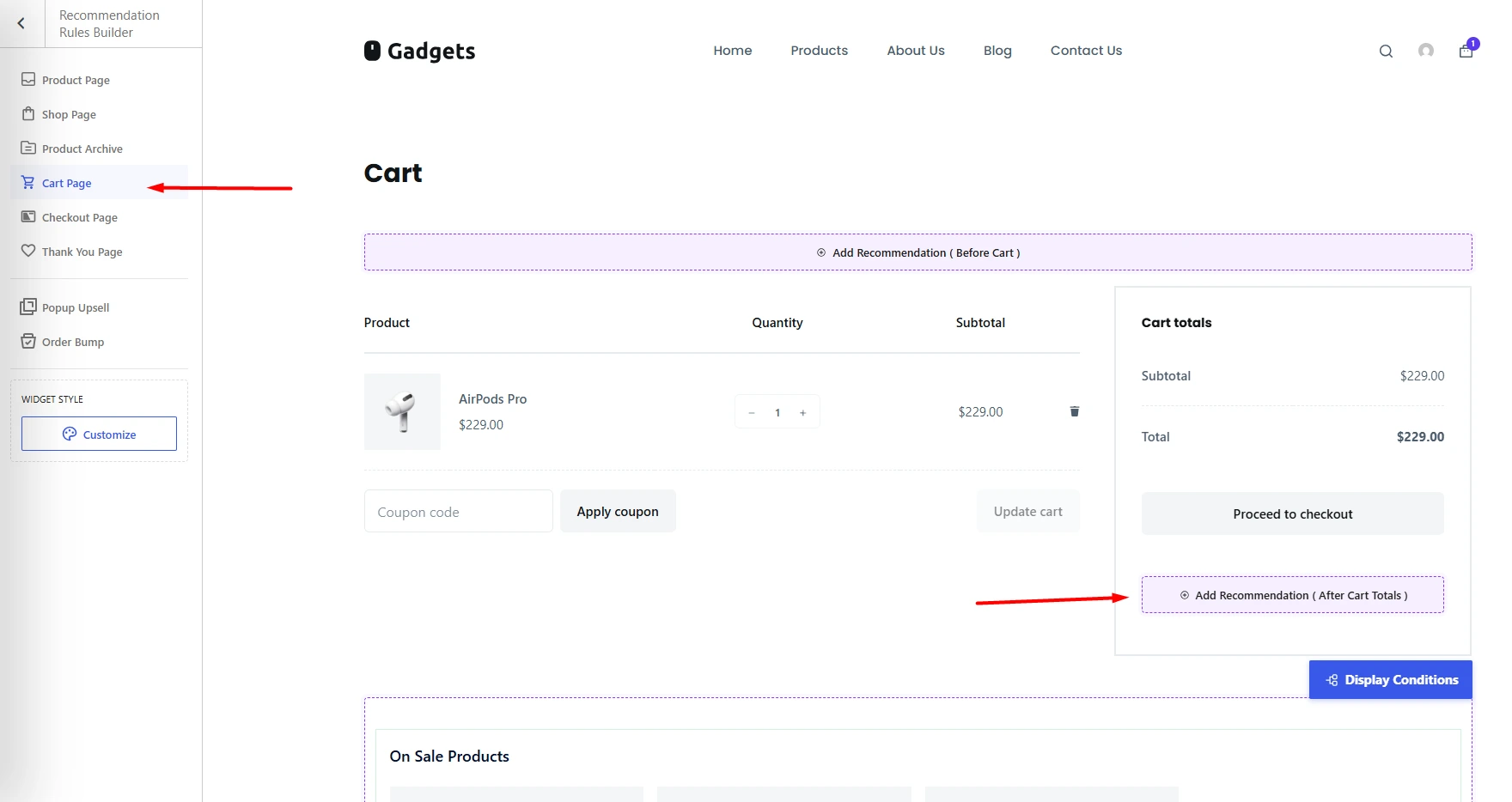
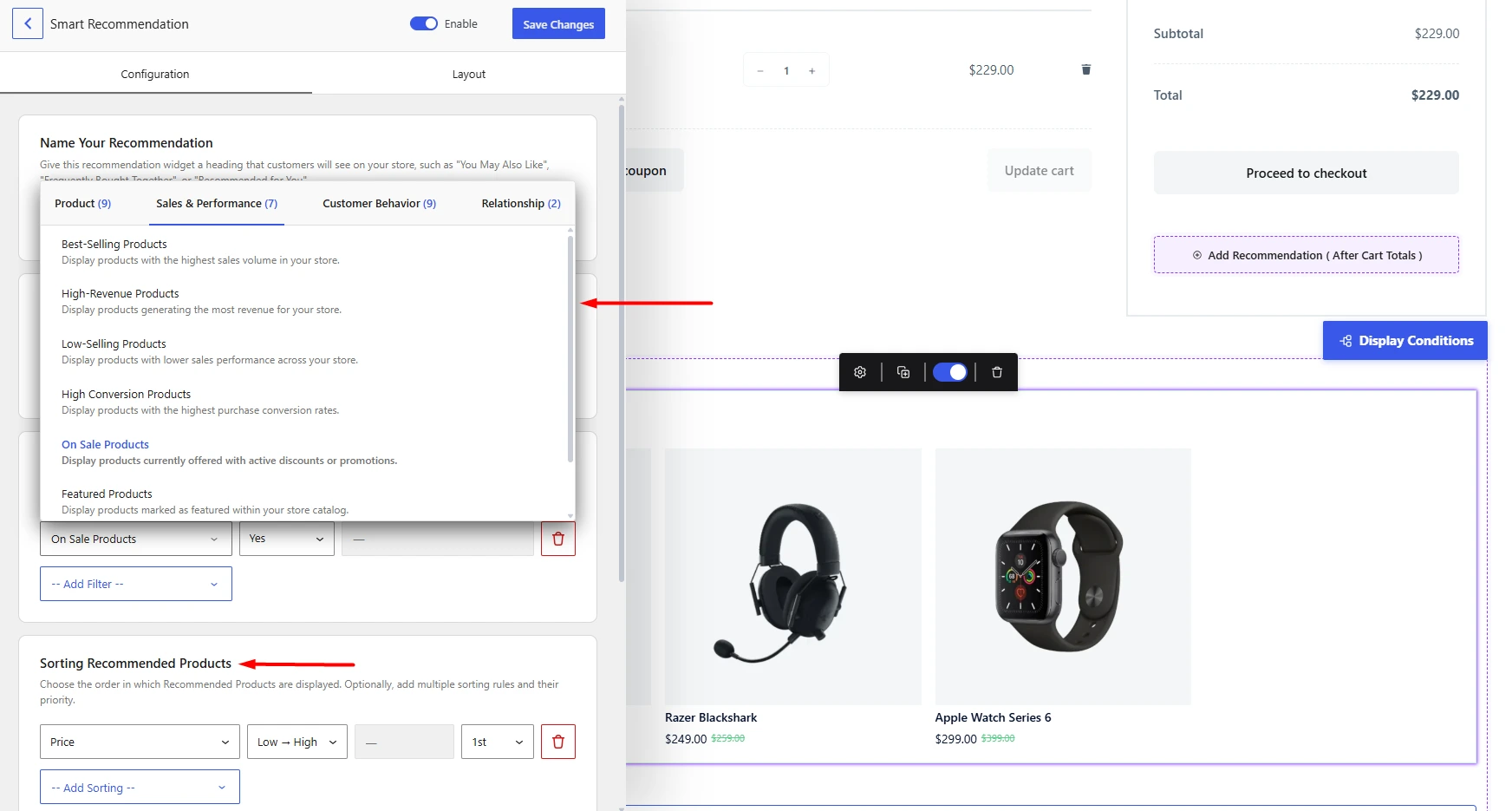
- Select the products to recommend. Add filters based on products, customer behavior, sales performance, or product relationships.
- Choose how products should be sorted. You can prioritize popularity, conversion, freshness, price, ratings, and other signals.
- Customize the layout. Choose the layout, number of products, responsive columns, visible product information, and other design settings.
- Add scheduling or display conditions if required.
- Review the live preview and publish.
WowRecommend also includes premade templates where the name, filters, sorting, layout, and other settings are already configured. You can load one, make any changes you need, and save it.
This is one area where the plugin feels different from managing WooCommerce upsells manually. You create a recommendation strategy once and allow its rules to decide what should be displayed.
Is WowRecommend Beginner-Friendly, or Do You Need Coding Knowledge?
You do not need coding knowledge to create recommendations with WowRecommend.
Everything happens through the visual Recommendation Rules Builder. You select the target page, choose a placement, configure the recommendation, and see the result alongside your settings using the live preview.
There are also three practical ways to build recommendations.
Start with a premade recommendation template
If you do not want to build everything from scratch, you can select one of the premade templates.
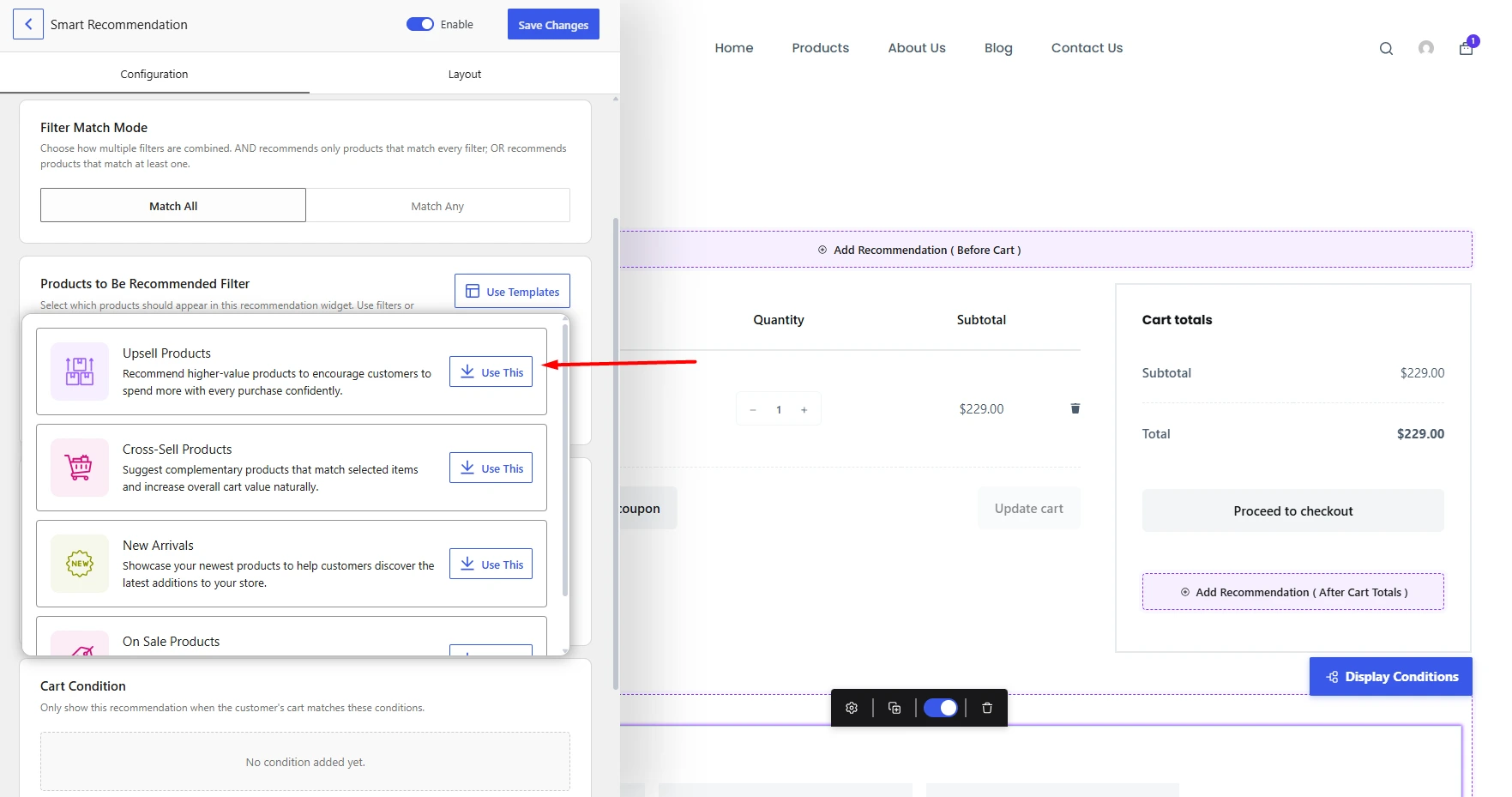
Templates come with predefined filters, sorting, and other settings. You can use the template as it is or adjust the individual settings before publishing.
Follow the Guided Steps
Guided Steps are useful when you know what you want to achieve but do not know which filters and settings to select.
For example, you might choose a goal such as Upsell Products, Bought Together, Best Sellers, New Arrivals, Personalized Picks, or On-Sale Deals. WowRecommend then guides you through the relevant choices and creates the recommendation for you.
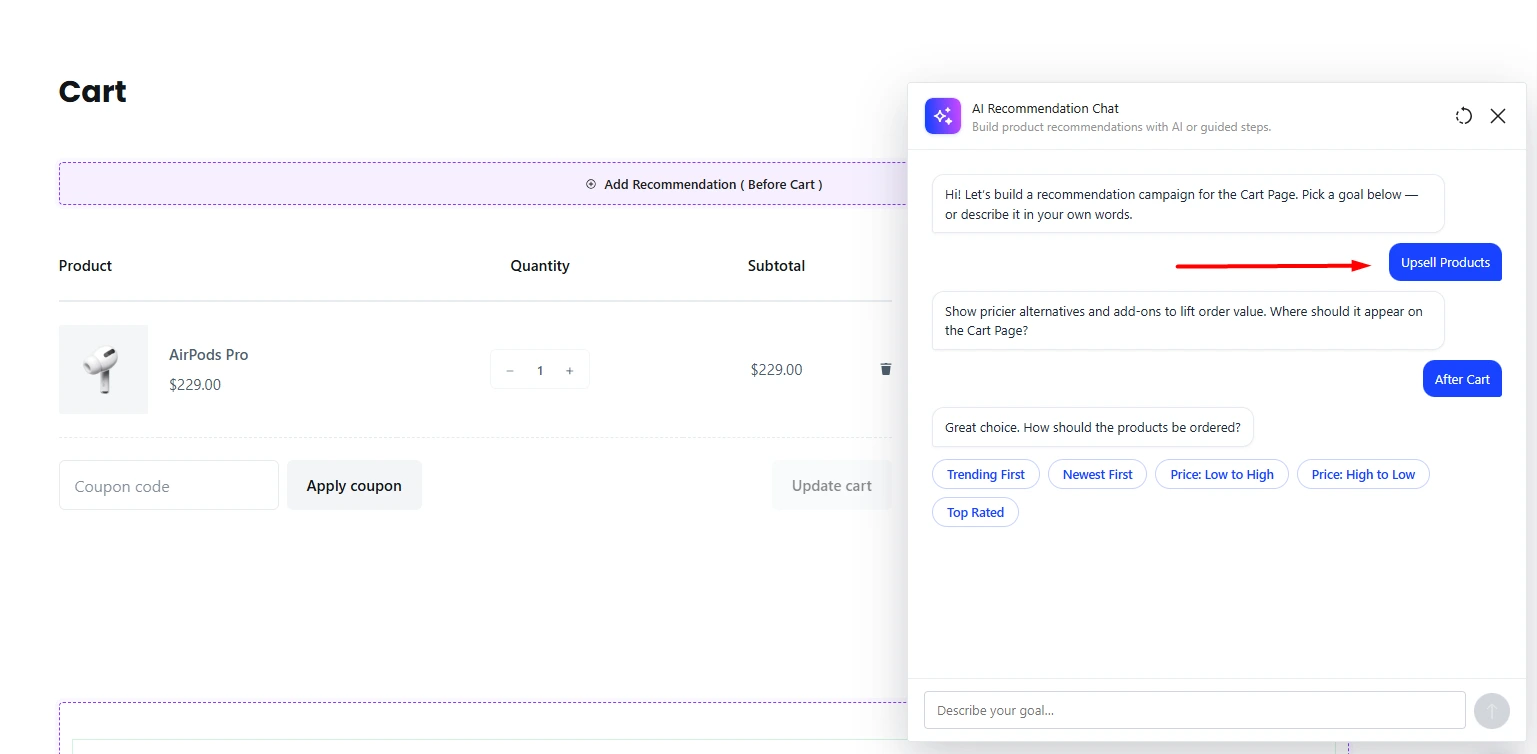
Importantly, Guided Steps do not require an AI provider.
Tell AI what recommendation you want
If you prefer an even more conversational approach, you can connect a supported AI provider and simply explain your requirement.
You could write something like:
Recommend best-selling products on product pages and exclude out-of-stock items.
WowRecommend can translate that request into a working recommendation rule. You can then continue the conversation to refine the rule, change its placement, add filters, or modify the sorting.
AI is optional. You can still build recommendations manually or use Guided Steps without connecting an AI provider.
What Advanced Customization Features Do You Get with WowRecommend Pro?
The Free version gives you enough tools to build useful recommendations based on your catalog, browsing history, previous purchases, related products, and cross-sells.
WowRecommend Pro becomes more relevant when you want recommendations based on performance data, deeper customer intent, stronger product relationships, and high-conversion pages such as cart and checkout.
Recommend products based on relative price
Pro adds Relative Price filter. It is particularly useful for upselling. Instead of manually choosing a more expensive alternative for every product, you can build rules around the relationship between the current product’s price and the products you want to recommend.
Build recommendations around actual sales performance
WowRecommend PRO lets you recommend products based on:
- Best-Selling Products
- High-Revenue Products
- Low-Selling Products
- High Conversion Products
- On Sale Products
- Featured Products
- High Click-Through Products
These filters let recommendations support different goals.
A store may push its proven best sellers on one page while using another recommendation to give slow-moving inventory more visibility.
Personalize recommendations with deeper customer behavior
The Free version already supports Products Viewed, Recently Viewed, Frequently Viewed, and Previously Purchased products.
Pro adds another layer with Added to Cart, Removed from Cart, Customer Interest Categories, Customer Interest Tags, and Customer Interest Attributes.
This opens up more interesting recommendation strategies.
For example, you can build recommendations around categories a shopper repeatedly interacts with instead of showing everyone the same products.
Create smarter upsells and bought-together recommendations
WowRecommend Pro expands the product relationship filters with Upsell Products and Complementary or Bought Together Products.
Bought Together recommendations can use real order relationships to identify products customers commonly purchase together.
This makes the recommendation much more useful than simply displaying random products from the same category.
Show recommendations on the cart, checkout, and thank-you pages
The Free version supports recommendations on the Product, Shop, and Product Archive pages.
Pro adds the Cart, Checkout, and Thank You pages, giving you access to several of the highest-intent stages of the purchase journey.
This matters because the recommendation strategy can change depending on where the shopper is.
A product page might be a good place for alternatives or upgrades. At checkout, a simple low-cost add-on is usually more appropriate.
Create targeted popup upsells
Popup Upsells are also part of WowRecommend Pro.
You can control which products trigger a popup, which page it should appear on, when it opens, and which products should be recommended. The popup itself can be configured from the builder with a live preview.
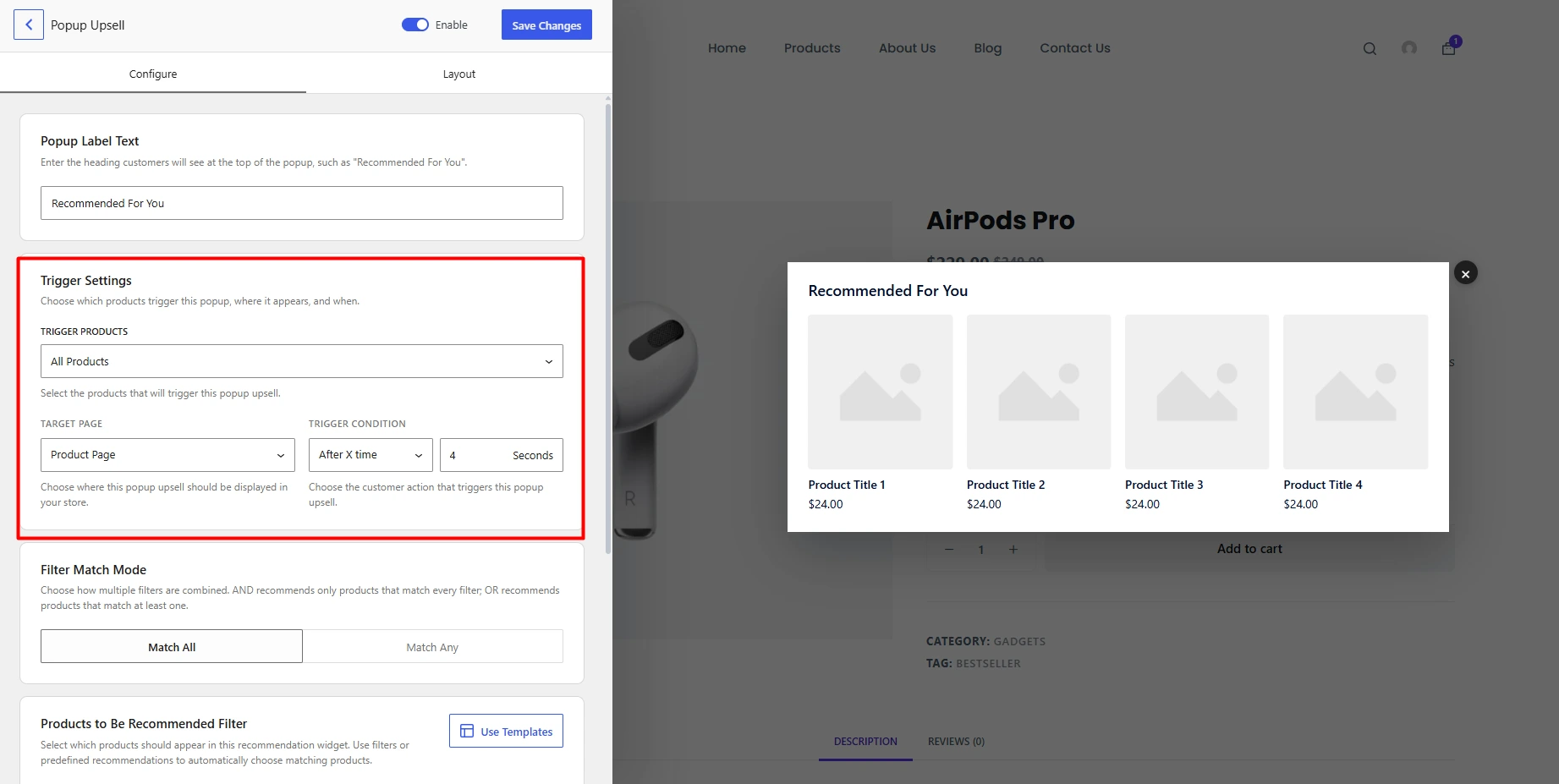
For example, someone adding a camera to their cart can trigger a popup recommending a compatible memory card or battery.
Add checkout order bumps
Pro also includes checkout order bumps.
An order bump lets you place a simple additional offer directly inside the checkout process. Customers can add the recommended item without leaving the checkout.
This works particularly well for products that require little extra consideration, such as accessories, gift packaging, extended product packs, or other low-cost complementary items.
What Are Customers Saying About WowRecommend?
WowRecommend is a recently launched plugin and currently it has 12 reviews on WordPress.org, with all 12 giving it five stars.
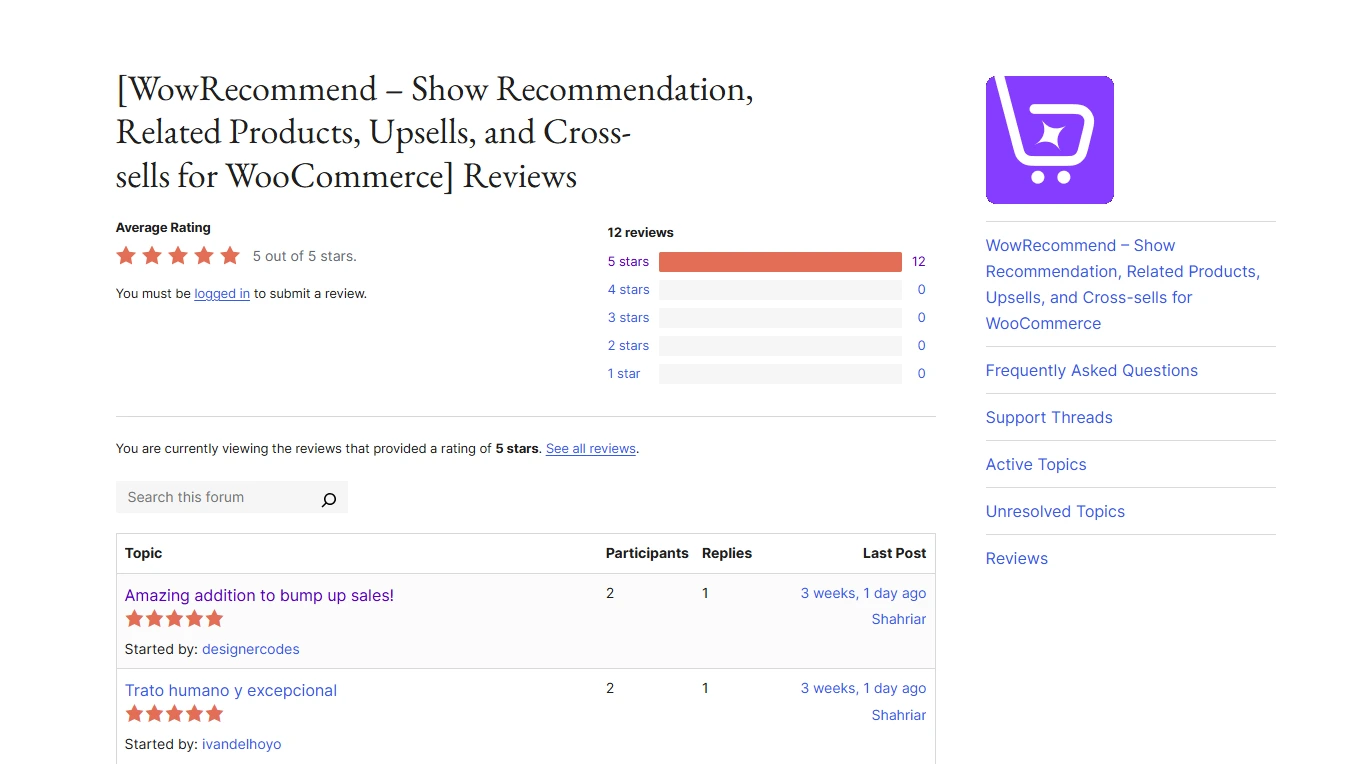
Though the plugin is still relatively new, the existing reviews give some useful insights into where users are finding value.
Ready-made templates make the first setup faster
One reviewer, designercodes, highlighted the ready-made templates after testing the plugin for a few days.
They say:
“Testing WowRecommend for 2-3 days now and really love the way it works and ready templates are really useful to quickly setup things in a tried and tested way. Wishing best and looking forward for more updates on this..”
Their feedback focused on how useful the templates were for quickly getting recommendation strategies running without building everything from scratch.
The AI rule builder can save a lot of manual work
Reviewer Suryakant Nirbhay specifically highlighted the AI-assisted rule builder.
They described it as a time saver while also mentioning that the recommendation options remain flexible.
That balance is important. AI is most useful here as a faster way to build the initial logic, while the normal rule builder remains available when you want precise control.
Automation and fast support stood out together
Reviewer artoodetoo1 compared WowRecommend with WooCommerce’s standard related products, upsells, and cross-sells.
They liked being able to automate recommendation rules across the store and specifically mentioned features such as Frequently Bought Together and Recently Viewed Products.
They say:
“Native WooCommerce provides basic related products, up-sells, and cross-sells, but manual setup takes hours. As your online shop grows, this manual workload becomes unsustainable. WowRecommend replaces those boring tasks with fast, automated rules applied across your entire shop in minutes.”
He also heavily praises the support team of WowRecommend:
“I reached out via live chat before buying to check a feature. The support team replied within minutes with clear, precise feedback. That quick, helpful service convinced me to upgrade to the premium version right away.”
This is useful feedback because it touches on both sides of buying a plugin: whether the product saves time and whether help is available when something is unclear.
AI or manual setup, it’s users’ choice
Reviewer Garry focused on the natural-language recommendation setup, advanced filters, and placement flexibility.
Their experience suggests that the AI workflow does not replace the more detailed controls. Instead, it gives users a quicker entry point into them.
They point out:
“WowRecommend has been a fantastic addition to my WooCommerce store. The ability to set up recommendation rules using natural language makes it incredibly easy to configure, yet it remains extremely powerful with over 32 advanced filters. I love how flexible the placements are, allowing for seamless upsells and order bumps exactly where they matter most. It’s a must-have plugin for anyone looking to effortlessly increase their average order value! ”
How Good Are WowRecommend’s Development and Support?
A useful plugin is not only about the features available today. For something as closely connected to WooCommerce as a recommendation system, active maintenance matters too.
WowRecommend’s development history has been fairly active since its initial 1.0.0 release on June 8, 2026.
The changelog shows eight subsequent releases through version 1.1.1 on September 30, 2026. Those releases included new features, compatibility improvements, user-interface refinements, and multiple bug fixes.
Version 1.0.4 was particularly significant. It introduced the AI chat assistant, live rule builder, guided onboarding, premade templates, revenue analytics, and global widget styling.
Later updates improved popup upsells, order bumps, variable-product handling, RTL slider stability, recommendation rotation, product selection, and other parts of the experience.
Version 1.1.1 then introduced a Filter Match Mode for choosing whether products need to match all filters or any matching filter.
The reviews also give us some indication of support quality.
The previously mentioned reviewer reported a live-chat response within minutes. Another reviewer, digitalagencyone, described the support team as responsive and helpful and said they were focused on finding solutions rather than simply providing generic answers.
WowRecommend Yearly vs Lifetime Plan: Which Gives You More Value?
WowRecommend currently offers two lifetime plans, as of this writing.
The current offer is:
| WowRecommend Plan | Current Price | License | Updates & Support |
| 1 Site Lifetime | $99 | 1 website | Lifetime |
| Unlimited Sites Lifetime | $199 | Unlimited websites | Lifetime |
Both are one-time payments, and WPXPO currently lists lifetime updates and support as part of the offer. The plans also come with a 14-day money-back guarantee.
This is one of the more interesting parts of the WowRecommend pricing model.
Many competing product recommendation plugins use annual subscriptions. That is perfectly reasonable for software receiving ongoing updates, but it means the cost accumulates if you plan to keep using the plugin for several years.
Here is how three comparable WooCommerce recommendation plugins currently price a single-site or entry license.
| Plugin | Current Pricing | 3-Year Cost* | 5-Year Cost* | Potential 5-Year Saving with $99 WowRecommend Lifetime |
|---|---|---|---|---|
| WowRecommend | $99 lifetime | $99 | $99 | Baseline |
| WooCommerce Product Recommendations by Woo | $99/year | $297 | $495 | $396 |
| WebToffee Product Recommendations | $89/year | $267 | $445 | $346 |
| WooCommerce Recommendation Engine | $79/year | $237 | $395 | $296 |
*The multi-year figures assume the listed annual price remains unchanged and the subscription is renewed each year.
WooCommerce’s official Product Recommendations extension currently costs $99 per year. It provides rule-based recommendation engines, multiple placements, and recommendation analytics.
WebToffee’s Product Recommendations plugin currently starts at $89 per year for one site. Its license includes one year of updates and support.
WooCommerce Recommendation Engine by Element Stark currently costs $79 per year. Its focus is more heavily centered around automatic recommendations generated from products customers view and purchase together.
These are not identical products, so pricing should not be the only comparison.
Still, if you expect to use a product recommendation plugin for three, four, or five years, WowRecommend’s current $99 one-time single-site license changes the cost equation considerably.
And the $199 unlimited-site lifetime plan becomes even more interesting for agencies or users running several WooCommerce stores, since you are not paying another annual subscription for every year you keep those sites active.
This is where the lifetime model becomes one of the stronger reasons to consider a WPXPO product. You pay more than a typical monthly software expense upfront, but there is no annual renewal cost under the current lifetime offer.
So, should you buy the WowRecommend plugin?
WowRecommend is not simply another related-products plugin.
Its main strength is offering a complete WooCommerce recommendation strategy into one interface. You can build rule-based recommendations, personalize them using customer behavior, decide where they appear, prioritize products with sorting rules, preview everything visually, and measure the revenue those recommendations generate.
The Free version is a sensible starting point if you mainly need recommendations based on categories, tags, attributes, brands, price, stock status, browsing behavior, previous purchases, related products, and cross-sells.
Pro makes more sense when recommendations are part of your actual revenue strategy.
That is where you get performance-based filters, deeper customer-interest data, upsells, bought-together relationships, cart and checkout placements, post-purchase recommendations, popup upsells, and checkout order bumps.
Usability is another strong point. You can start from a template, follow Guided Steps, configure everything manually, or describe your requirement to AI. Whichever route you take, the recommendation still ends up inside the same live builder where you can review and modify it.
There are a couple of things to keep in perspective.
The current lifetime pricing also makes the long-term cost unusually attractive compared with recommendation plugins that require annual renewals.
If you want something more advanced than WooCommerce’s default related products but still want to manage everything without coding, WowRecommend is a strong option to consider.
WowRecommend FAQs: What Should You Know Before Buying?
Is WowRecommend free?
Yes. WowRecommend has a Free version with core recommendation features.
The Free version includes product-based filters such as categories, tags, attributes, brands, price, and stock status. It also supports Products Viewed, Recently Viewed, Frequently Viewed, Previously Purchased, Related Products, and Cross-sell Products.
What is the difference between WowRecommend Free and Pro?
The Free version focuses on core product, browsing-history, purchase-history, related-product, and cross-sell recommendations.
Pro adds advanced catalog filters, sales-performance filters, cart behavior, customer-interest filters, upsell and bought-together recommendations, cart/checkout/thank-you placements, popup upsells, and checkout order bumps.
Do I need AI to use WowRecommend?
No. You can manually configure recommendations or use Guided Steps without connecting an AI provider. AI is an optional way to create and modify recommendation rules using natural-language instructions.
How does WowRecommend use AI for product recommendations?
WowRecommend uses AI to help build the recommendation rule, rather than asking AI to blindly choose products every time your store loads.
After connecting a supported provider, you describe what you want in plain English. The plugin translates that request into filters, placement, sorting, and other recommendation settings that you can review and modify.
Can WowRecommend create personalized product recommendations?
Yes. The plugin includes customer-behavior filters such as recently viewed products, frequently viewed products, and previous purchases. Pro adds cart actions and interest-based signals using categories, tags, and attributes.
Can I create upsells and cross-sells with WowRecommend?
Yes. Cross-sell Products are available among the Free relationship filters, while the dedicated Upsell Products relationship filter is included with Pro. Pro also adds popup upsells and checkout order bumps for additional upselling opportunities.
Does WowRecommend track whether recommendations generate sales?
Yes. Its analytics can track recommendation-driven add-to-cart activity, orders, revenue, conversion rate, and average order value. This helps you compare recommendation strategies instead of judging them only by how they look.
Can I run temporary or seasonal recommendations?
Yes. WowRecommend includes scheduling controls that let you start recommendations immediately or at a later date and optionally set an ending date. This can be useful for Black Friday, seasonal promotions, launches, and limited-time campaigns.
Can I use different recommendation strategies at the same location?
Yes. WowRecommend includes display conditions for handling multiple recommendation widgets in the same position. You can show eligible recommendations together or use sequential display behavior depending on your setup.
Is WowRecommend worth buying if I only have a small store?
It depends on how much recommendation control you need. A very small catalog may be manageable with WooCommerce’s native recommendations. But WowRecommend becomes more useful when you want automated rules, personalized suggestions, multiple placements, recommendation analytics, or a system that can continue working as your product catalog grows.