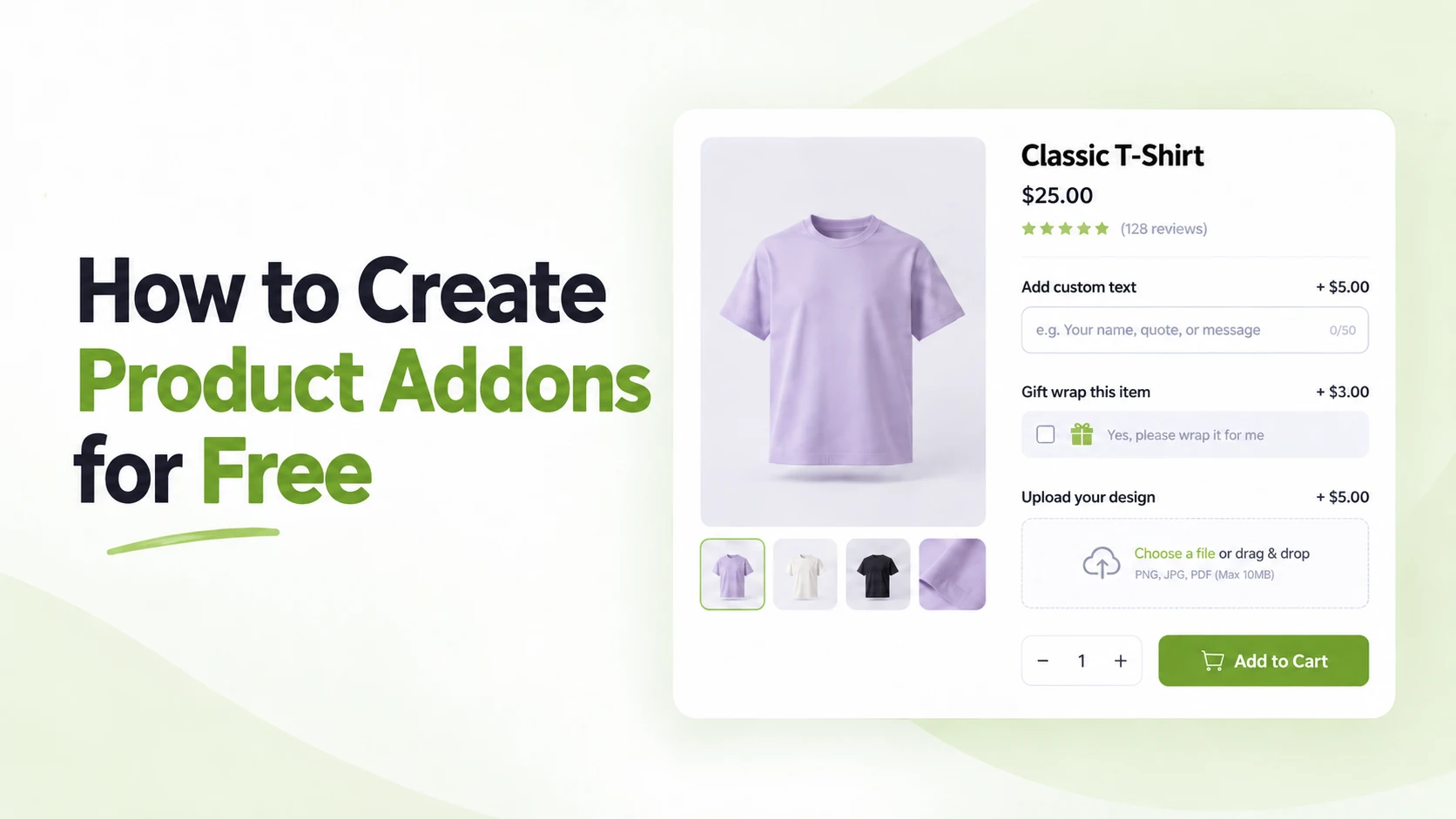
A standard WooCommerce product page works well when customers only need to choose a product and add it to the cart. But things get limiting when you sell personalized gifts, printed products, configurable items, extra services, or anything that needs more customer input.
That is where product addons become useful. You can add text fields, checkboxes, dropdowns, file uploads, date selectors, paid extras, and other options directly to the product page.
The good part is that you do not necessarily need a premium plugin to get started. Several free WooCommerce product addon plugins now provide enough functionality to create genuinely useful product customization experiences.
In this guide, we will show you how to create product addons for free and compare five free plugins that approach the job differently.
Quick Comparison of the Best Free Product Addon Plugins
Here is a quick comparison before we get into the details.
| Plugin | Free Addon Features | Key Strength | Best For |
| WowAddons | 20+ free fields, file upload, pricing, conditional logic, addon builder, live preview | Broad free functionality | Overall best free product addon solution with 20+ free fields |
| WPC Product Options | File upload, date pickers, color options, pricing | Wide field selection | Stores needing different input types |
| Extra Product Options by WPActPro | Nested conditional logic, fixed pricing | Advanced conditions | Complex conditional product options |
These plugins are not identical. Some provide more fields, some focus on conditional logic, and others make global option management easier.
If you also want to compare premium tools and more established solutions, we have a separate guide covering the best WooCommerce product addon plugins.
What Can You Do With a Free Product Addon Plugin?
A free addon plugin can do much more than add an extra checkbox to your product page.
Depending on the plugin, you can create personalized products, collect customer requirements, charge for upgrades, and simplify complex product configurations.
Add Extra Options to Product Pages
WooCommerce variations work well for options such as size and color when each combination represents a specific product variation.
Product addons are better when you need extra information or optional choices. This can be an engraving message, gift packaging, installation service, delivery date, or an uploaded design.
Let Customers Personalize Products
Text fields are one of the simplest examples.
A jewelry store can collect engraving text. A gift store can let buyers enter a custom message. A print shop can combine text fields with file uploads so customers can send their own artwork.
This lets shoppers configure the product directly instead of contacting the store after placing the order.
Add Paid Product Extras
Addons can also work as small upsells.
Imagine selling a laptop with optional setup service, extended warranty, or premium packaging. Each selected option can add an extra amount to the product price.
This is different from a traditional cart upsell because the offer becomes part of the product configuration itself. If you want to add offers later in the purchase journey, our WooCommerce cart upsell guide explains that approach separately.
Show Fields Only When They Are Relevant
Conditional logic makes complex product pages easier to manage.
For example, you can first ask:
Do you want personalized engraving?
If the customer chooses “Yes,” the engraving text field appears. If they choose “No,” the field stays hidden.
This prevents customers from seeing options that do not apply to them.
Collect Files, Dates, and Other Information
Some free plugins now offer more specialized fields too.
A print shop can accept artwork uploads. A bakery can collect delivery dates. A service business can ask customers for preferred times or additional instructions.
You can build surprisingly detailed product configurations without creating dozens of WooCommerce variations.
Choosing the Right Free Product Addon Plugins
Now let us look more closely at what each plugin actually gives you for free.
1. WowAddons
Best for: Overall free WooCommerce product addons
WowAddons is an advanced product addons plugin for WooCommerce. Instead of focusing on just a handful of basic fields, its free version covers text inputs, selections, uploads, date and time choices, layout elements, and other practical add-on requirements.
It also includes a visual builder, addon pricing, conditional logic, and flexible product assignment. That combination makes it useful for both simple personalization and more detailed configurable products.
What You Get for Free
- Use 20+ free addon fields including text, textarea, number, radio, checkbox, switch, dropdown, range slider, and color picker.
- Allow customers to upload images, documents, and other supported files.
- Collect dates, times, URLs, telephone numbers, email addresses, and longer instructions.
- Add regular pricing to product options and update the product price based on customer selections.
- Show or hide fields using conditional logic.
- Intuitive addon builder with live preview feature.
- Assign addon sets to all products, individual products, or selected product categories.
- Organize fields using sections, separators, spacers, custom content, and popup fields.
2. WPC Product Options for WooCommerce
Best for: Stores that need many different field types
WPC Product Options stands out because of the variety of input types available.
It supports text fields, file uploads, radio buttons, image and color choices, checkboxes, dimensions, date pickers, date ranges, time pickers, headings, shortcodes, and several other field types. You can create global option sets and then override or disable them for individual products.
What You Get for Free
- Accept customer file uploads from product pages.
- Add image, color, radio, checkbox, and dropdown choices.
- Collect dates, date ranges, times, dimensions, and numeric values.
- Create reusable global addon sets across multiple products.
- Add flat or percentage-based prices and quantity-synced charges.
- Insert custom content through shortcode fields.
3. Extra Product Options for WooCommerce by WPActPro
Best for: Advanced conditional product options
WPActPro’s Extra Product Options plugin is particularly interesting if conditional logic is your main priority.
The free version currently includes a wide library of fields and supports nested AND/OR conditional rules. This lets you create more detailed display conditions than a basic “show field B when field A is selected” setup.
What You Get for Free
- Create nested conditional logic using AND/OR rule groups.
- Assign fields based on products, categories, and tags.
- Add fixed prices to selectable addon options.
- Build options using a drag-and-drop interface.
- Customize labels, placeholders, CSS classes, layouts, and other field settings.
What We Considered When Choosing These Free Plugins
We focused on what store owners can actually use for free, not just the number of features listed on the plugin page.
Useful Fields Available for Free
We looked at whether plugins offer practical fields such as text, checkboxes, uploads, dates, colors, sliders, and other useful product options.
Conditional Logic
Conditional logic helps keep product pages cleaner by showing fields only when they are relevant to a customer’s previous choices.
Addon Pricing
We checked whether users can charge extra for options such as gift wrapping, engraving, premium materials, or additional services.
Used properly, these extras can also work as product-page upsells. You can explore more ideas in our guide to the best plugins for high-converting WooCommerce stores.
Product Assignment
Reusable option sets and category-based assignment make it easier to apply the same addons across multiple products.
Ease of Setup
We prioritized plugins with clear builders, simple controls, and reusable option groups that are easy to manage.
Active Development and User Feedback
We also checked recent updates, compatibility, ratings, and WordPress.org reviews to avoid relying only on older plugins with large install counts.
How to Create Product Addons for Free in WooCommerce
For this example, we will use WowAddons because its free version includes a broad collection of fields, conditional logic, pricing controls, file uploads, and flexible product assignment.
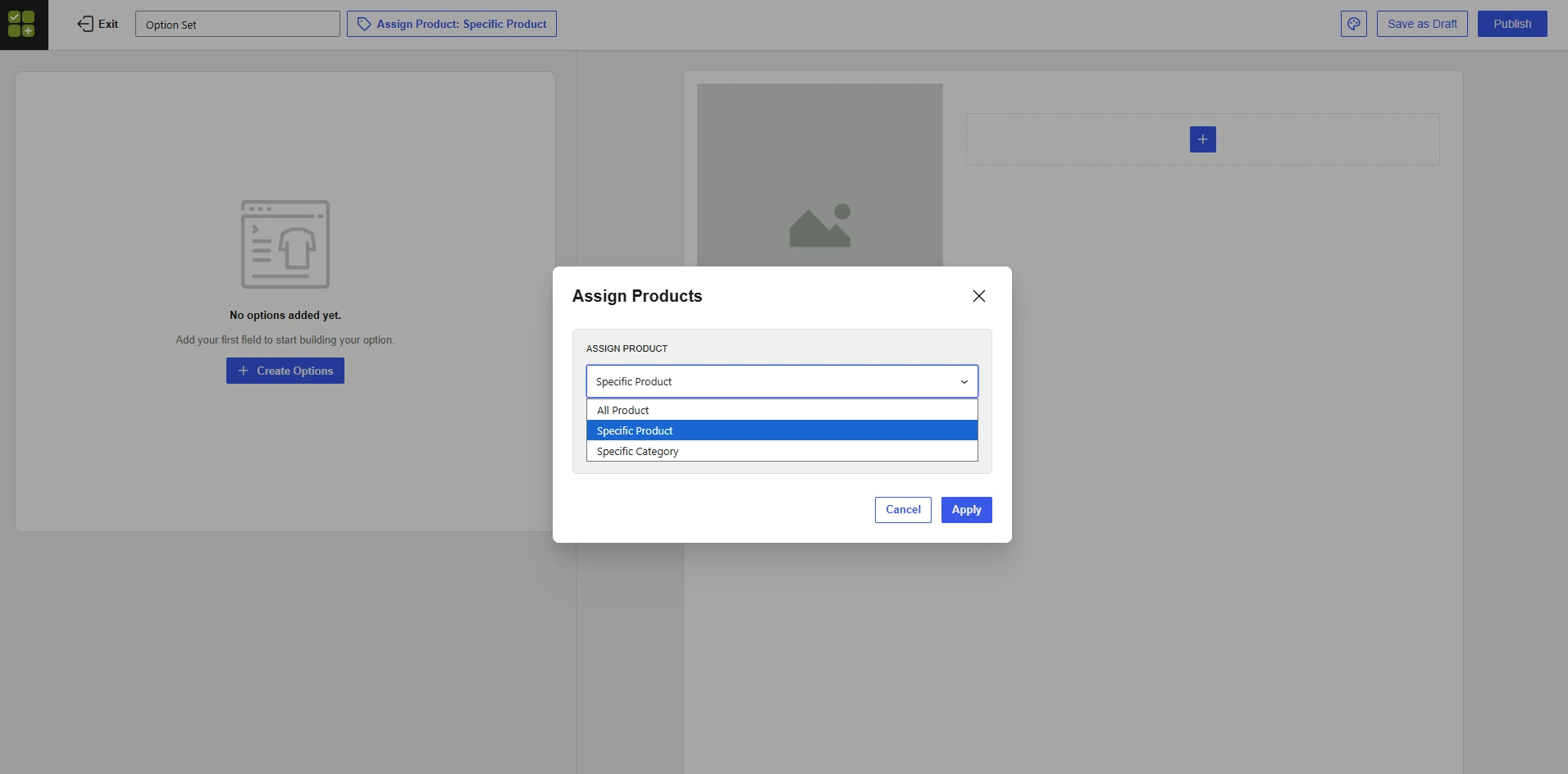
First, install and activate WowAddons just like any other plugin. Then open the WowAddons dashboard and choose Create Option.
Step 1: Choose Where to Show the Addons
Start by deciding which products should use the addon set.
WowAddons lets you assign it to all products, specific products, or products from specific categories. This means you can create one addon set and reuse it instead of rebuilding the same fields repeatedly.
Step 2: Add Your Preferred Product Fields
Click the + Create Options inside the addon builder and choose the fields you need.
For example, you can add a text field for a personalized name, an upload field for artwork, and a checkbox for optional gift packaging. Multiple fields can be added to the same addon set.
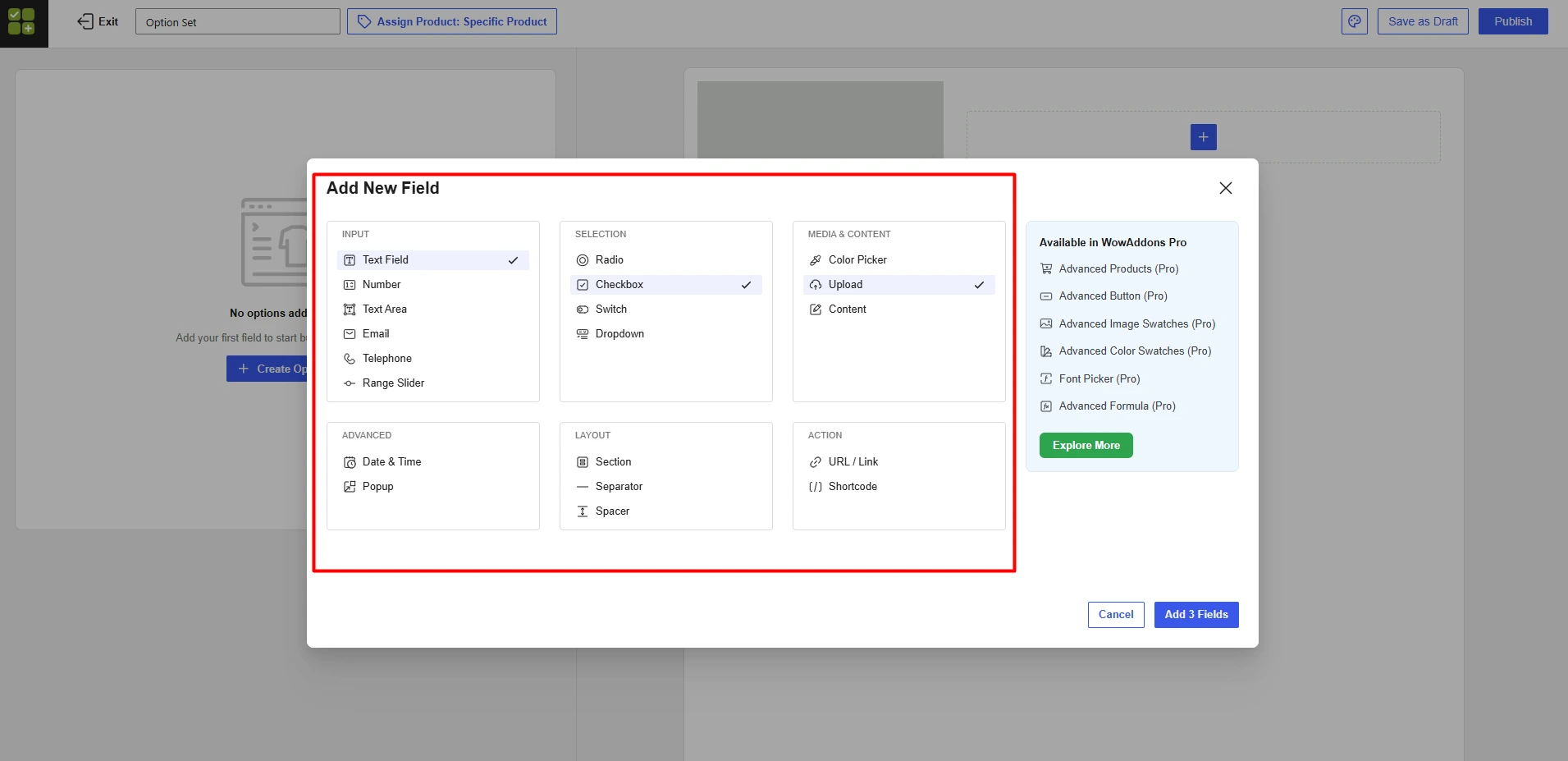
Currently, WowAddons provides 20 add-on fields in its FREE version. So, you can pick the addons you like and build the customized product page for free.
Step 3: Customize Each Addon
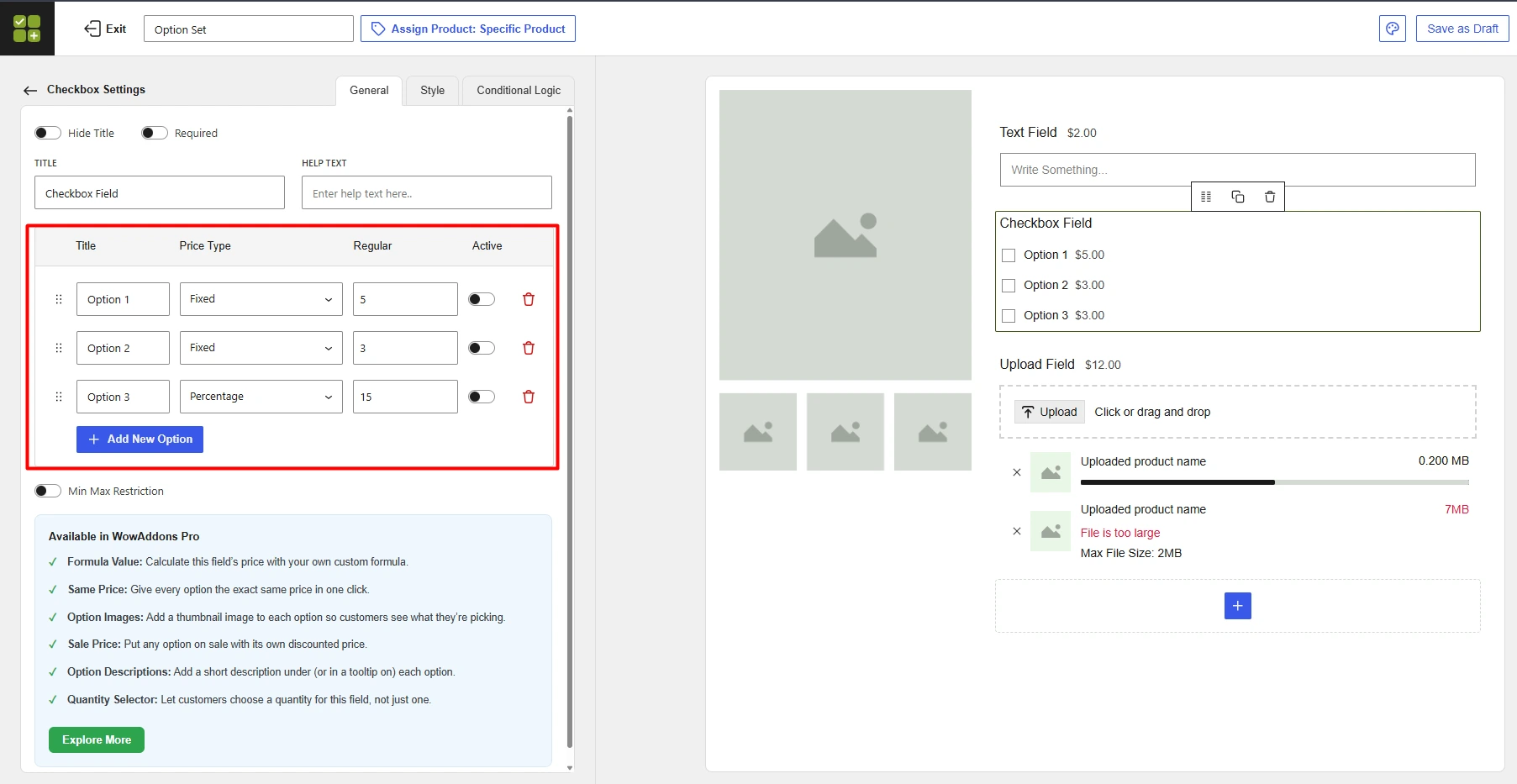
Select any field to configure its settings.
You can change the field title, help text, required status, and individual option labels. For selectable fields, you can also set pricing for each option using fixed or percentage-based values.
You can further customize the field appearance from the Style tab and use Conditional Logic to show or hide fields based on previous customer selections.
Step 4: Save and Publish
Once everything looks right, save your changes and switch the addon set from Draft to Publish.
You can also use Global Styles if you want to adjust common colors, text styles, and field appearance across your addons.
That is enough to create your first free WooCommerce product addon.
One useful distinction here: product addons and product bundles mean different things while both help you increase average order value. We also have a dedicated guide on how to create product bundles for free in WooCommerce.
So, Which Free Product Addon Plugin Should You Choose?
There is no need to install the plugin with the longest feature list. Choose the one that matches how your products are configured.
Choose WowAddons if you want the strongest overall balance of free fields, file uploads, conditional logic, add-on pricing, flexible assignment, styling, and ease of use. It is our top free option for most WooCommerce stores.
Choose WPC Product Options if having a wide range of field types is your priority, especially date, time, color, dimension, file upload, and shortcode fields.
Choose Extra Product Options by WPActPro if your main requirement is advanced nested conditional logic without immediately upgrading to a paid plan.
For most stores, start small. Add only the options customers genuinely need, make the choices easy to understand, and expand the configuration once you know how shoppers use it.
FAQs About Creating WooCommerce Product Addons for Free
Does WooCommerce Support Product Addons for Free?
WooCommerce itself supports attributes and variations, but it does not provide the same flexible product-addon builder you get from dedicated addon plugins.
A free plugin such as WowAddons can add text fields, uploads, checkboxes, dropdowns, dates, pricing, and other custom options without requiring custom code.
What Is the Best Free Product Addon Plugin for WooCommerce?
Our overall choice is WowAddons. Its free version covers a broad range of product fields along with file uploads, regular add-on pricing, conditional logic, reusable product assignment, and styling controls. That gives most stores enough flexibility to start creating customizable products without paying immediately.
Can I Add Custom Fields to WooCommerce Products for Free?
Yes. All four plugins discussed here let you add custom product fields for free. The exact fields available depend on the plugin.
Can Free Product Addon Plugins Add Extra Charges?
Yes, several of them can. WowAddons supports pricing for product options. WPC Product Options and WPActPro also provide free pricing controls, although some advanced pricing methods require their premium versions.
Can I Add Conditional Product Options for Free?
Yes. WowAddons, WPActPro, and Product Option Kit all document conditional logic in their free offerings. WPActPro is particularly notable for providing nested AND/OR conditional rule groups.
Summing Up
Creating product addons does not need to start with an expensive extension.
Free plugins now give WooCommerce stores enough flexibility to collect custom text, offer paid extras, accept uploads, use conditional logic, and create much more configurable product pages.
Among the options we tested and researched, WowAddons offers the strongest overall free package because the free version covers a wide variety of practical addon requirements without limiting users to only basic text and selection fields.
Start with one product and build the options your customers genuinely need. Once that setup works smoothly, you can reuse the same approach across other products and categories.